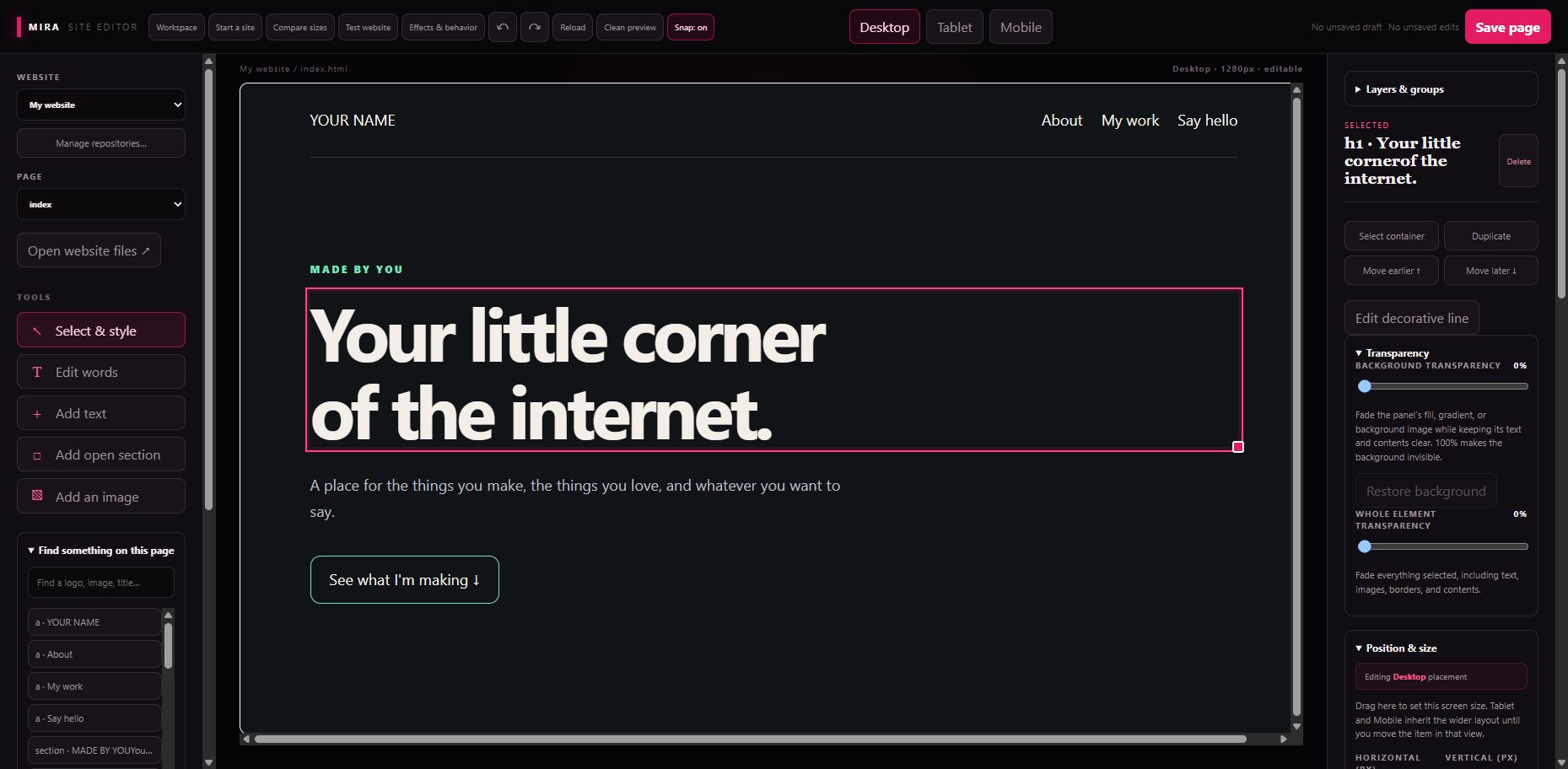
Make it yours.
Words, images, fonts, spacing, backgrounds, layers, and separate layouts for different screens.
Keep your work.
Local saves, backups, protected drafts, undo, checkpoints, and a ZIP export of your website.
Send it when ready.
Review changes, push to your own GitHub repo, and let your connected host deploy them.
We made an editor for our own sites. Then Mia asked whether other people could use it. So here you go.
Click your words. Move your images. Change the colors, fonts, spacing, backgrounds, and layout. Make the page look how you actually want it to look. Your website is real HTML, CSS, and JavaScript in your own folder and your own Git repo.
Start with the included template, download your existing GitHub repo, or add a website already on your PC. The package includes its runtime and Git. Extract the whole ZIP and open Mira-Site-Editor.exe.
Save keeps your changes on your PC with a backup. Publish lets you review them and pushes them to your GitHub repo. Your website host must already deploy that repo; the editor does not set up hosting for you. For a brand-new starter, create an empty GitHub repo and enter its URL and your commit details in Manage repositories. Git Credential Manager handles your own sign-in when needed.
There are protected drafts, undo and redo, layers and groups, image uploads, font previews, separate phone layouts, comparison previews, release history, and website ZIP export. Test website runs your site's scripts in an isolated preview.
This is our first community preview, and we're being straight with you: it edits HTML/CSS/JavaScript sites. React apps, WordPress, and server frameworks need their own adapters. Runtime-generated content and complicated CSS can still need source edits. The initial Windows launcher is unsigned. If your device blocks it, don't bypass your security; use approved tooling or ask your administrator.
Free to use for your own websites, including commercial ones, under the included community license. Your content stays yours. Keep your backups and review before publishing. Found something broken, or have a good idea? Tell us through the Support Hub.
Open it in three steps
- Download and extract the whole ZIP.
- Double-click Mira-Site-Editor.exe.
- Choose Start a site, or add your existing local Git website.
Keep the app and runtime folders together. Node and Git are bundled. Your websites live in Documents/Mira Websites; your editor data and backups live in %LOCALAPPDATA%/MiraSiteEditor.
Does Publish set up hosting?
Hosting must already be connected to your Git branch. The editor pushes your reviewed changes and checks the configured live site. Entering a live URL alone does not create that connection.
What can I edit?
HTML/CSS/JavaScript sites in Git. React, WordPress and server frameworks need dedicated adapters. Complicated CSS and runtime-generated content can still require source edits. Use Test website for script behavior; backend forms need their real server.
Updates, privacy and the community license
Extract a newer package into a separate folder after closing the old editor. Your websites and backups stay outside the app. No editor telemetry is added. GitHub and website checks use the network when requested; scripts in Test website may make their own network requests.
The first Windows release is unsigned. If your device blocks it, use approved tooling or ask your administrator. The community license permits free use for your own sites, including commercial ones. Bundled software retains its third-party licenses.
Download: 80,473,151 bytes (76.7 MiB). Version 0.5.0. Published October 7, 2026.
SHA-256
2a55b6121a19c945953ee06a1cc9db925538e3e73450fb76fbe2dcea9b976f21