- Version
- 1.0.0
- Availability
- Download ZIP; 181,024 bytes.
- Requirements
- Windows 10 or 11. No administrator access or network required.
- Limitations
- Windows supports the cursor artwork and animated Busy role; the website-only fading trail is not a Windows cursor feature.
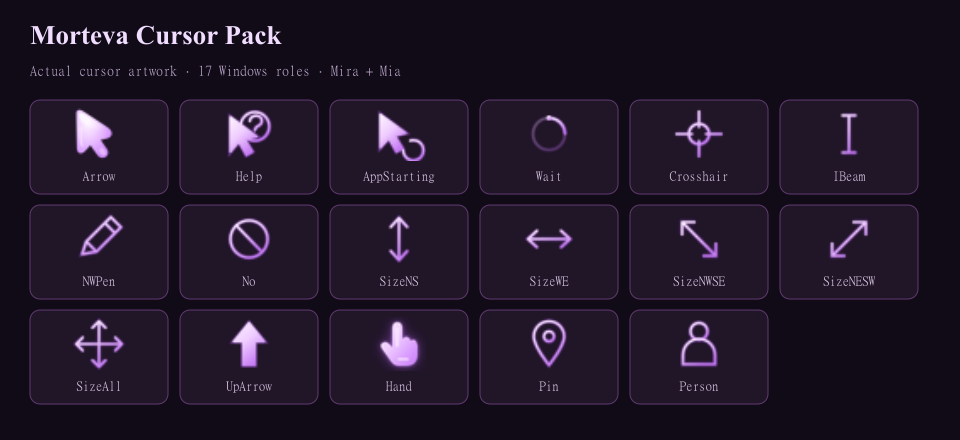
The purple arrow and link hand from morteva.com, with matching text, precision, handwriting, unavailable, resize, move, alternate, help, location and person cursors. Busy gets an animated purple ring.
The arrow is rendered from the exact website SVG. The link cursor is the existing website .cur file, unchanged. Normal, text and resize artwork include sizes for different Windows scaling settings.
Install: extract the whole ZIP and open Install.vbs. It saves your current scheme as Before Morteva Cursor Pack, registers the new scheme and opens Mouse Properties > Pointers. Select Morteva Cursor Pack and click Apply. Your current setup stays active until you apply it, and you can keep your current Busy cursor.
Manual setup: browse to each matching .cur file in Mouse Properties > Pointers; Busy uses Wait.ani. Save As Morteva Cursor Pack and keep the extracted folder.
Switch back: select Before Morteva Cursor Pack or your previous scheme and click Apply. To remove, apply another scheme first, delete Morteva Cursor Pack from Mouse Properties, then remove %LOCALAPPDATA%\MortevaCursorPack.
No administrator access, background app, telemetry or network. Windows loaded all 17 roles at 32, 48 and 64 pixels. The fading pointer trail stays a website effect.
SHA-256
a291bf1bf81253900b1f900a219f2ed34f8db26d4d37b0b427bead432a93d4af