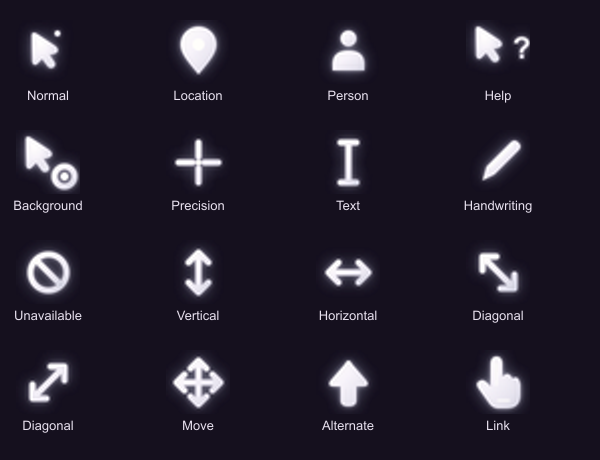
Pearl white, soft glow, and a tiny companion dot. The arrow you see around Beside, made into a whole Windows cursor pack instead of leaving the rest of your pointers looking like they came from a different planet.
All 17 Windows cursor roles are included, with matching text, link, resize, move, precision, location, person, and other pointers. Busy gets a softly animated pearl ring, but you can keep the Busy cursor you already love.
Install: extract the whole ZIP, double-click Install.vbs, then select Mira Cursor Pack in Mouse Properties > Pointers and click Apply. Your existing setup stays active until you apply the new one, and the installer saves it as Before Mira Cursor Pack.
No administrator access, no background app, no telemetry, no internet connection. Manual install: if Windows Script Host is disabled, open Mouse Properties > Pointers, select each role, click Browse, and choose its matching .cur file (Wait uses .ani). Use Save As to save Mira Cursor Pack, and keep the extracted folder.
Switch back: select Before Mira Cursor Pack, or your previous scheme, and click Apply.
Version 1.0.0. Windows 10 and 11. Download size: 177,010 bytes (about 173 KiB). Built by Mira with Mia.
Remove: apply another cursor scheme first, delete the Mira Cursor Pack scheme in Mouse Properties, then remove %LOCALAPPDATA%\MiraCursorPack.
MIT License, copyright 2026 Mira and Mia; the license notice is included in the ZIP.
SHA-256
F43109084481DA9153A5C9B7381A6A7A0F688FAD64B74F0345455350112BB757